Announcing shiny.webawesome: a web UI package for R/Shiny

shiny.webawesome brings Web Awesome to R Shiny through generated wrappers, reactive bindings, and a bundled runtime. It aims for complete component support while staying close enough to upstream that the Web Awesome docs and examples are directly useful in everyday package use.

CRAN | R-universe | Package website | Source repository

Background

shiny.webawesome started from a perceived gap: Shiny would benefit from a UI library that feels modern, visually polished, and broad enough to support a full app coherently. Web Awesome was a strong fit because it combines rich components, layout and styling utilities, and detailed upstream documentation with a standards-based web-components structure that is straightforward to track from R. That makes it easier for the package to stay close to upstream while still fitting naturally into Shiny.

The Whole Game

Here’s a screenshot of a simple, complete example app using shiny.webawesome. The full live app and code are available in an article at: https://mbanand.github.io/ghpages/announcement/..
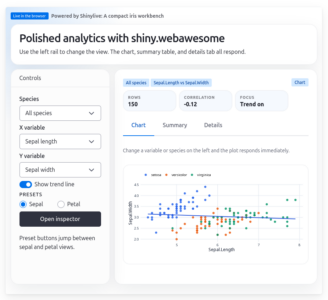
Screenshot of a shiny.webawesome example app showing a control sidebar and coordinated chart, summary, and details views.

This example showcases many of the facilities available in the package:

  • a visually rich component library
  • direct use of Web Awesome layout utilities such as wa-stack, wa-cluster, wa-gap-*, and wa-align-* classes
  • styling through Web Awesome design tokens and classes such as --wa-color-*, --wa-font-*, and wa-body-*
  • reactive Shiny input bindings
  • helpers for calling methods on HTML elements, setting properties, and injecting simple JavaScript snippets

Design Philosophy

shiny.webawesome is designed to stay close to upstream Web Awesome. Most component wrappers are generated from Web Awesome metadata, which helps preserve upstream names, structure, and behavior while translating the interface into normal R conventions such as snake_case.

That close alignment has a practical benefit: when you want deeper details, examples, or component-specific guidance, you can usually go straight to the upstream Web Awesome documentation and apply what you find directly in shiny.webawesome. The package currently supports all Web Awesome components, so the upstream docs are a practical reference for day-to-day use.

To support the server-client model of Shiny, the package adds a small set of page and layout helpers, curated reactive bindings, and a narrow command layer for cases where browser-side interaction goes beyond the generated wrappers.

The result is a package with a clear default path. Use generated wrappers for ordinary UI, use bindings for meaningful reactive state, and reach for commands or small JavaScript glue when the app needs them.

Shiny Bindings

shiny.webawesome does not forward every browser event and every detail of component telemetry into Shiny. Much component state and interaction detail is better handled locally in the browser rather than turned into server messages. Consequently, the package exposes only a curated set of Shiny bindings that fit Shiny’s reactive model, with an emphasis on meaningful committed state rather than low-level browser event streams.

In the most common case, a binding publishes a durable semantic value. A select reports its current value, a dialog can report whether it is open, and a tree can report the currently selected item ids. The key idea is that Shiny receives the state the app actually cares about, not the raw event name that happened to produce it.

Some components are better treated as actions than values. A button is the clearest example: in Shiny, it behaves like a Shiny action input, with each click producing a new input event. A small number of components need both action semantics and a separate value. A dropdown, for example, may need to trigger reactivity on every choice, including repeated selections of the same item, while also exposing the latest selected value.

This design keeps reactive messaging to the server smaller, clearer, and easier to reason about. If an interaction belongs naturally in Shiny’s input model, shiny.webawesome will expose it as a binding. If it is more naturally a browser-side concern, it is usually a better fit for the command layer or a small amount of JavaScript glue.

For the full binding categories, semantics, and examples, see the package article: Shiny Bindings.

Command API

shiny.webawesome covers the most common interaction patterns through generated wrappers, Shiny bindings, and update helpers. But sometimes an app still needs to reach into a live browser element directly: set a property, call a method, or add a small browser-local JavaScript snippet.

For those cases, the package provides a narrow command API. The two main server-side helpers are wa_set_property() and wa_call_method(). They let Shiny code send one-way commands to a browser element identified by id, either by assigning a value to a live property or invoking a browser-side method.

If a component already has a binding or update helper, that should usually remain the first choice. The command layer is for the cases that fall just outside those built-in paths, where the simplest solution is still to tell the existing browser component to do one specific thing.

The package also includes wa_js() for a different kind of job: small, app-local JavaScript glue. That is useful when the missing piece is browser-side logic such as listening for an event, reading live component state, or publishing a derived value back to Shiny with Shiny.setInputValue().

For more detail and examples, see the package article: Command API.

Conclusion

shiny.webawesome brings a visually rich component library into Shiny while staying close to upstream Web Awesome. That combination gives polished components, useful layout and styling utilities, and a workflow where upstream documentation and examples remain directly relevant throughout app development.

For more examples, longer articles, and full reference material, see the package website: shiny-webawesome.org.

CougarStats: a free and open-source Statistics web app for Teaching and Learning

Hello,

I’d like to share CougarStats, a free and open-source R Shiny web app I developed to support the teaching and learning of Statistics. CougarStats runs entirely in a browser and is designed for accessibility and ease of use. You can explore the app here: https://www.cougarstats.ca/ 
 
The name CougarStats is inspired by Mount Royal University’s athletics mascot, the cougar, symbolizing strength and agility, and by the app’s focus on statistics. 
 
Key features of CougarStats
 
  • Descriptive Statistics: Compute measures like mean, median, mode, quartiles, IQR, standard deviation, and identify potential outliers. 
  • Data Visualization: Construct Boxplots, Histograms, and Scatterplots. 
  • Probability: Calculate marginal, joint, union, and conditional probability for contingency tables; exact and cumulative probabilities for Binomial, Poisson, Negative Binomial and Hypergeometric distributions; and cumulative probabilities for the Normal distribution. 
  • Sample Size Estimation: Determine the required sample sizes for various scenarios. 
  • Statistical Inference: Construct confidence intervals, conduct hypothesis tests for one- and two-samples (mean, proportion and standard deviation). 
  • ANOVA: Perform one-way Analysis of Variance with an option to conduct Bonferroni post hoc tests. 
  • Regression and Correlation: Fit simple linear regression models and compute Pearson correlation coefficient, multiple linear regression, logistic regression. 
  • Categorical Data Analysis: Perform Chi-Square test of independence with and without Yates’ continuity correction, Fisher’s exact test. 
  • Nonparametric Tests: Perform the Mann-Whitney U Test, Kruskal-Wallis test etc.
 
I would be delighted if you could explore CougarStats and share it with your students and colleagues who might find it useful.
 
Thank you for your time, and I look forward to hearing your thoughts.
 
Sincerely, 
Ashok


Ashok Krishnamurthy, PhD
Associate Professor
Department of Mathematics and Computing
Mount Royal University
4825 Mount Royal Gate SW
Calgary, AB, T3E 6K6 Canada

Introduction to data analysis with {Statgarten}.


Overview

Data analysis is a useful way to help solve problems in quite a few situations.

There are many things that go into effective data analysis, but three are commonly mentioned

1. defining the problem you want to solve through data analysis
2. meaningful data collected
3. the skills (and expertise) to analyze the data

R is often mentioned as a way to effectively fill the third of these, but at the same time, it’s often seen as a big barrier for people who haven’t used R before (or have no programming experience).

In my previous work experience, there were many situations where I was able to turn experiences into insights and produce meaningful results with a little data analysis, even if I was “not a data person”.

For this purpose, We have developed an open source R package called “Statgarten” that allows you to utilize the features of R without having to use R directly, and I would like to introduce it.

Here’s the repo link (Note, some description is written in Korean yet)


👣 Flow of data analysis

The order and components may vary depending on your situation, but I like to define it as five broad flows.

1. data preparation
2. EDA
3. data visualization
4. calculate statistics
5. share results

In this article, I’ll share a lightweight data analysis example that follows these steps (while utilizing R’s features and not typing R code whenever possible).

Note, Since our work is still in progress, including deployment in the form of a web application, we will utilize R packages.
Install
With this code, you can install all components of statgarten system. 
remotes::install_github('statgarten/statgarten')
library(statgarten)
Run
The core of the statgarten ecosystem is door, which allows you to bundle other functional packages together. (Of course, you can also use each package as a separate shiny module)

Let’s load the door library, and run it via run_app.
library(door)

run_app() # OR door::run_app()
If you didn’t set anything, the shiny application will run in Rstudio’s viewer panel, but we recommend running it in a web browser like Chrome via the Show in new window icon (Icon to the left of the Stop button)

Statgarten app main pageIf you don’t have any problems running it (please raise an issue on DOOR to let us know if you do), you should see the screen below.
1. Data preparation
There are four ways to prepare data for Statgarten. 1) Upload a file from your local PC, 2) Enter the URL of a file, 3) Enter the URL of a Google Sheet, or 4) Finally, utilize the public data included in statgarten, which can be found in the tabs File, URL, Google Sheet, and Datatoys respectively.

In this example, we will utilize the public data named bloodTest.

bloodTest
contains blood test data from 2014-15 provided by the National Health Insurance Service in South Korea.
1.5 Define the problem
Utilizing bloodtest data, we’ll try to see clues for this question

“Are people with high total cholesterol more likely to be diagnosed with anemia and cerebrovascular disease, and does the incidence vary by gender?” 
With a few clicks, select the data as shown below. (after selection, click Import data button)

statgarten data select


Before we start EDA, let’s process the data for analysis.

In keeping with the theme, we will “remove” data that is not needed and change some numeric values to the type of factor.

This can be done with the Update Data button, where data selection is done with the checkbox. The type can be changed in the New class.

2. EDA
You can see the organization of the data in the EDA pane below, where we see that the genders are 1 and 2, so we’ll use the Replace function on the Transform Data button to change them to M/F.


3. Data visualization
In the Vis Panel, you can also visualize anemia (ANE) and total cholesterol (TCHOL) by dragging, as well as total cholesterol by cerebrovascular disease  (STK) status. 


However, it’s hard to tell from the figure if there is a significant difference (in both case).
4. Statistics
You can view the distribution of values by data and key statistics via Distribution in the EDA panel.


For the anemia (ANE) and cerebrovascular disease variables (STK), we see that 0 (never diagnosed) is 92.2% and 93.7%, respectively, and 1 (diagnosed) is 7.8% and 6.3%, respectively.


In the Stat Panel, let’s create a “Table 1” to represent the baseline characteristics of the data, based on anemia status (ANE).


Cerebrovascular disease status(STK) , again from Table 1, we can see that the value of total cholesterol (TCHOL) by gender (SEX) is significant with a Pvalue less than 0.05.


5. Share result
I think quarto (or Rmarkdown) is the most effective way to share data analysis results in R, but utilizing it in a shiny app is another matter.

As a result, statgarten’s results sharing is limited to exporting a data table or downloading an image.


⛳ Statgarten as Open source

The statgarten project has goal for

In order to help process and utilize data in a rapidly growing data economy and foster data literacy for all.
The project is being developed with the support of the Ministry of Science and ICT of the Republic of Korea, and has been selected as a target for the 2022 Information and Communication Technology Development Project and the Standards Development Support Project.

But at the same time, it is an open source project that everyone can use and contribute to freely. (We’ve also used other open source projects in the development process)

It is being developed in various forms such as web app, docker, and R package, and is open to various forms of contributions such as development, case sharing, and suggestions.

Please try it out, raise an issue, fork or stargaze it, or suggest what you need, and we’ll do our best to incorporate it, so please support us 🙂

For more information, you can check out our github page or drop us an email.

Thanks.

(Translated with DeepL ❤️)