RStudio AI That Doesn’t Cost a Penny: llmcoder vs. Posit AI Assistant

Introduction

If you’re an R user, you’ve probably experienced these moments:

  • You’re writing code and forgot the exact syntax for a function
  • Your code throws an error and you’re staring at a confusing error message
  • You have a block of code but want to understand what it does in plain English
  • You want to chat with an AI assistant about your data analysis, but don’t want to leave RStudio

llmcoder is an RStudio addin that solves all of these problems by integrating Large Language Model (LLM) assistance directly into your RStudio workflow, and more importantly, it’s FREE!

In this post, I’ll show you how llmcoder can speed up your R coding and make your workflow smoother.

Watch a quick demo of llmcoder in action:

https://youtu.be/SRzjaURbKCw


Installation

You can install llmcoder from GitHub:

# Install remotes if you haven't already
install.packages("remotes")

# Install llmcoder
remotes::install_github("ShiyangZheng/llmcoder")

Load the package:

library(llmcoder)

Feature 1: Generate R Code from Inline Comments

Ever wish you could just type what you want in plain English and get R code instantly?

How to use:

  1. Type a comment describing what you want
  2. Place your cursor on that line
  3. Use the Addins menu and select “Generate Code from Comment”

Example:

# Load the mtcars dataset and create a scatter plot of mpg vs wt, colored by number of cylinders

After running the addin, the comment is replaced with:

library(ggplot2)
data(mtcars)
ggplot(mtcars, aes(x = wt, y = mpg, color = factor(cyl))) +
  geom_point(size = 3, alpha = 0.8) +
  labs(
    title = "Fuel Efficiency vs Weight by Cylinder Count",
    x = "Weight (1000 lbs)",
    y = "Miles per Gallon",
    color = "Cylinders"
  ) +
  theme_minimal()

No more switching to ChatGPT or copying code from Stack Overflow!


Feature 2: Fix Console Errors with LLM Assistance

We’ve all been there – a cryptic error message and you’re not sure what went wrong.

How to use:

  1. Run code that produces an error
  2. The error appears in the console
  3. Use the Addins menu and select “Fix Error with LLM”

Example:

library(dplyr)
data %>%
  filter(cyl == 4) %>%
  summary()
# Error: object 'data' not found

llmcoder captures the error and sends it to the LLM, which returns an explanation and suggests:

mtcars %>% filter(cyl == 4) %>% summary()

Feature 3: Explain Selected Code in Plain English

Sometimes you inherit code from a colleague or find a Stack Overflow answer and want to understand what it does.

How to use:

  1. Select a block of code in the editor
  2. Use the Addins menu and select “Explain Code”

Example:

mtcars %>%
  group_by(cyl) %>%
  summarize(
    mean_mpg = mean(mpg, na.rm = TRUE),
    sd_mpg = sd(mpg, na.rm = TRUE),
    count = n()
  ) %>%
  arrange(desc(mean_mpg))

llmcoder returns:

  1. Takes the built-in mtcars dataset
  2. Groups the data by the number of cylinders (cyl)
  3. Calculates the mean and standard deviation of miles per gallon (mpg) for each group
  4. Arranges the results in descending order of mean fuel efficiency

Feature 4: Multi-Turn Chat Panel with Session Context

This is the flagship feature. llmcoder includes a Chat Panel that understands your current R session.

How to open: Use the Addins menu and select “Open Chat Panel”

What makes it special?

The Chat Panel is session-aware:

  • It knows which packages you have loaded
  • It knows what objects are in your global environment
  • It can read the contents of your current script
  • It has access to your recent console history

Example conversation:

You: What’s the correlation between mpg and wt in mtcars?

AI: The correlation between mpg and wt in the mtcars dataset is -0.87, indicating a strong negative relationship. As weight increases, fuel efficiency decreases.

cor(mtcars$mpg, mtcars$wt, use = "complete.obs")

Want to see the Chat Panel in action? Watch this demo:
https://youtu.be/zP-RuCN3q14


Supported LLM Providers

llmcoder supports multiple LLM providers – you can choose the one that works best for you:

Provider API Key Notes
OpenAI (GPT-4/3.5) Yes Most popular
Anthropic (Claude) Yes Great for long conversations
DeepSeek Yes Cost-effective
Groq Yes Very fast inference
Together AI Yes Open-source models
OpenRouter Yes Access multiple models
Ollama No Fully local, no API key!
Custom endpoint Yes LM Studio, vLLM, llama.cpp

Privacy note: If you use Ollama, all processing happens locally on your machine. No data is sent to external servers.


Customization: Choose Your Prompt Style

The Chat Panel allows you to select different prompt styles:

  • General Assistant: Best for general questions
  • R Code Helper: Focuses on writing clean, idiomatic R code
  • Statistics Advisor: Helps with statistical concepts and test selection
  • Research (Psycho): Tailored for psycholinguistics researchers

Why llmcoder?

There are many AI coding assistants out there (Copilot, Cursor, etc.), so why llmcoder?

  1. Native RStudio integration: No need to switch to another app or browser tab
  2. Session-aware: The LLM knows what you’re working on
  3. Multiple LLM providers: Choose the one you prefer (or use a local model for privacy)
  4. Open source: MIT license, free to use and modify
  5. Designed for R users: Not a generic coding assistant – it understands R-specific workflows

Call to Action

Ready to try llmcoder?

remotes::install_github("ShiyangZheng/llmcoder")

GitHub: https://github.com/ShiyangZheng/llmcoder

If you encounter any bugs or have feature requests, please file an issue: https://github.com/ShiyangZheng/llmcoder/issues

Star the repo if you find it useful!


About the Author

Shiyang Zheng is a PhD student in Psycholinguistics at the University of Nottingham. His research focuses on idiom acquisition and computational modeling. He built llmcoder to make R coding easier for himself and the R community.

Ebook launch – Simple Data Science (R)

Simple Data Science (R) covers the fundamentals of data science and machine learning. The book is beginner-friendly and has detailed code examples. It is available at scribd.

cover image

Topics covered in the book –
  • Data science introduction
  • Basic statistics
  • Graphing with ggplot2 package
  • Exploratory Data Analysis
  • Machine Learning with caret package
  • Regression, classification, and clustering
  • Boosting with lightGBM package
  • Hands-on projects
  • Data science use cases

Tutorial: Cleaning and filtering data from Qualtrics surveys, and creating new variables from existing data

Hi fellow R users (and Qualtrics users),

As many Qualtrics surveys produce really similar output datasets, I created a tutorial with the most common steps to clean and filter data from datasets directly downloaded from Qualtrics.

You will also find some useful codes to handle data such as creating new variables in the dataframe from existing variables with functions and logical operators.

The tutorial is presented in the format of a downloadable R code with  explanations and annotations of each step. You will also find a raw Qualtrics dataset to work with.

Link to the tutorial: https://github.com/angelajw/QualtricsDataCleaning

This dataset comes from a Qualtrics survey with an experiment format (control and treatment conditions), but the codes can be applicable to non-experimental datasets as well, as many cleaning steps are the same.

New Package to Process TVDI index and Filter Golay Savitzky Raster

Description

  • Use MODIS image to calculate TVDI index
  • Make multiple Raster images at the same time
  • Can be used to calculate large image files
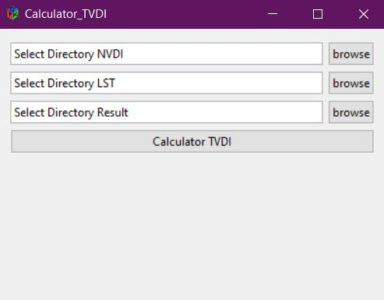
  • UI interface calculates TVDI index
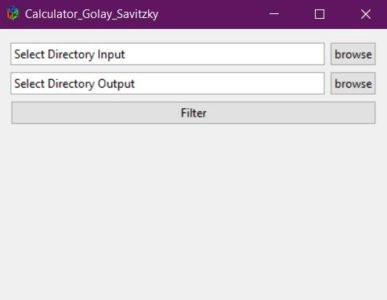
  • UI interface exports Golay Savitzky filter images
  • The functions in the TVDI package
    • Golay_Raster
    • Golay_GUI (may be failed if you don’t have GTK+)
    • Mean_Raster
    • Mask_Multi_Raster
    • IQR_Raster
    • TVDI_process
    • TVDI_Largefiles_process
    • TVDI_GUI (may be failed if you don’t have GTK+)

How to Download and Install

  • Download and Install from Github
install.packages("devtools")
library("devtools")
install_github("nguyenduclam/TVDIpk")
library("TVDIpk")
  • Install from Cran (waiting for update in Cran)
install.packages("TVDIpk")
  • Note that GTK+ library is not already installed on your system, installation may fail. In that case, please install and load the gWidgetsRGtk2 library beforehand:
install.packages("gWidgetsRGtk2")
library("gWidgetsRGtk2")

How to use Pakages

  1. Golay UI
    • Golay_GUI()
  2. TVDI UI
    • TVDI_GUI()

References

Reproducible development with Rmarkdown and Github

I’m pretty sure most readers of this blog are already familiar with Rmarkdown and Github. In this post I don’t pretend to invent the wheel but rather give a quick run-down of how I set-up and use these tools to produce high quality and scalable (in human time) reproducible data science development code.

Github

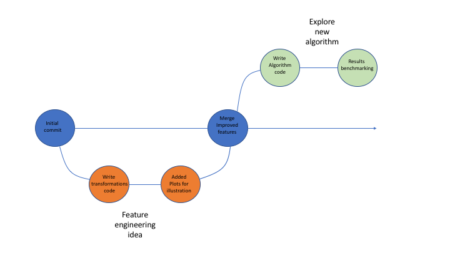
While data science processes usually don’t involve the exact same workflows like software development (for which Git was originally intended) I think Git is actually very well suited to the iterative nature of data-science tasks. When walking down different avenues in the exploration path, it’s worth while to have them reside in different branches. That way instead of jotting down in general pointers what you did along with some code snippets in some text file (or god-forbid word when you want to have images as well) you can instead go back to the relevant branch, see the different iterations and read a neat report with code and images. You can even re-visit ideas that didn’t make it into the master branch. Be sure to use informative branch names and commit messages!

Below is in illustration of how that process might look like:


Using Github allows one to easily package his code, supporting files etc (using repos) and share it with fellow researches, which can in turn clone the repo, re-run the code and go through all the development iterations without a hassle.

Rmarkdown

Most people familiar with Rmarkdown know it’s a great tool to write neat reports in all sorts of formats (html, PDF and even word!). One format that really makes it a great combo with Github is the github_document format. While one can’t view HTML files on Github, the output file from a github_document knit is an .md file which renders perfectly well on github, supporting images, tables, math, table of contents and many other. What some may not realize is that Rmarkdown is also a great development tool in itself. It behaves much like the popular Jupiter notebooks, with plots, tables and equations showing next to the code that generated them. What’s more, it has tons of cool features that really support reproducible development such as:
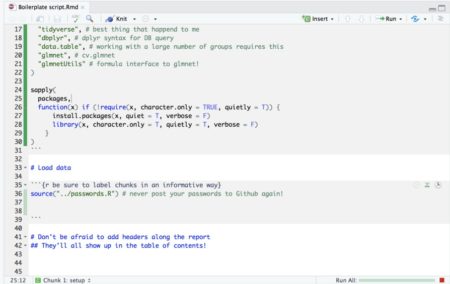
  • The first r-chunk (labled “setup” in the Rstudio template) always runs once when you execute code within chunks following it (pressing ctrl+Enter). It’s handy to load all packages used in later chucks (I like installing missing ones too) in this chunk such that whenever you run code within any of the chunks below it the needed packages are loaded.
  • When running code from within a chunk (pressing ctrl+Enter) the working directory will always be the one which the .Rmd file is located at. In short this means no more worrying about setting the working directory – be it when working on several projects simultaneously or when cloning a repo from Github.
  • It has many cool code execution tools such as a button to run code in all chunks up to the current one, run all code in the current chunk and it has a green progress bar so you don’t get lost too!
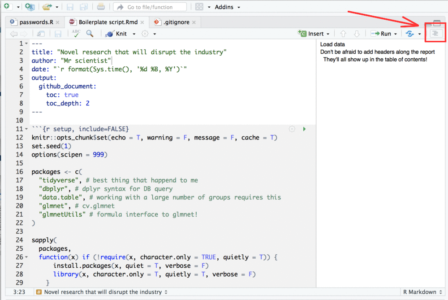
  • If your script is so long that scrolling around it becomes tedious, you can use this neat feature in Rstudio:  When viewing Rmarkdown files you can view an interactive table of contents that enables you to jump between sections (defined by # headers) in your code:

To summarize this section, I would highly recommend developing with Rmd files rather than R files.

A few set-up tips

  • Place a file “passwords.R” with all passwords in the directory to which you clone repos and source it via the Rmd. That way you don’t accidentally publish your passwords to Github
  • I like working with cache on all chunks in my Rmd. It’s usually good practice to avoid uploading the cache files generated in the process to Github so be sure to add to your .gitignore file the file types: *.RData, *.rdb, *.rdx, *.rds, *__packages
  • Github renders CSV files pretty nicely (and enables searching them conveniently)  so if you have some reference tables you want to include and you have a *.csv entry in your .gitignore  file, you may want to add to your .gitignore the following entry: !reference_table_which_renders_nicely_on_github.csv to exclude it from the exclusion list.

Sample Reproducible development repo

Feel free to clone the sample reproducible development repo below and get your reproducible project running ASAP!

https://github.com/IyarLin/boilerplate-script