 Figure 1. Basic syntax of Markdown
This makes formatting as you write quick – no more buttons or keyboard shortcuts. Subsequently, the text file can be exported in multiple file formats, including PDF, html and even as a Word file to satisfy co-authors who prefer to use Word’s track-changes function.
R Markdown is a flavour of Markdown: it allows you to include R code either as a code chunk between paragraphs of text, or as code within the text. This code is executable. As such, you can do analyses, make figures and format results automatically.
One problem I’ve worked on previously is checking the accuracy of p-values in the literature. My colleagues and I found that p-values can be mistyped or miscalculated, leading to inaccurate reporting of results, however unintentionally, in half of all papers, and leading to potential changes in the conclusions in one out of eight papers (in psychology; Nuijten et al. 2015). Enabling researchers to insert p-values via direct computation instead of manually copying results from statistical programmes will resolve this issue, for a start.
R Markdown is simple and easy to learn and use. I will show just one exciting aspect here. More extensive step-by-step guides are available. If you want to follow along, you will need to follow the steps described in Table 1.
Figure 1. Basic syntax of Markdown
This makes formatting as you write quick – no more buttons or keyboard shortcuts. Subsequently, the text file can be exported in multiple file formats, including PDF, html and even as a Word file to satisfy co-authors who prefer to use Word’s track-changes function.
R Markdown is a flavour of Markdown: it allows you to include R code either as a code chunk between paragraphs of text, or as code within the text. This code is executable. As such, you can do analyses, make figures and format results automatically.
One problem I’ve worked on previously is checking the accuracy of p-values in the literature. My colleagues and I found that p-values can be mistyped or miscalculated, leading to inaccurate reporting of results, however unintentionally, in half of all papers, and leading to potential changes in the conclusions in one out of eight papers (in psychology; Nuijten et al. 2015). Enabling researchers to insert p-values via direct computation instead of manually copying results from statistical programmes will resolve this issue, for a start.
R Markdown is simple and easy to learn and use. I will show just one exciting aspect here. More extensive step-by-step guides are available. If you want to follow along, you will need to follow the steps described in Table 1.
| Step 1 | Install R from https://cran.r-project.org/ and Rstudio from https://www.rstudio.com/products/rstudio/download/ |
|---|---|
| Step 2 | In RStudio, install the R Markdown package by typing in the console: > install.packages(‘R Markdown’) You will need to select a CRAN local to you, from which the package will be downloaded. |
| Step 3 | Once R Markdown is installed, go to File > New File > R Markdown file. This loads a new .Rmd file with a basic template already set out for you. |
Table 1. Getting started with R Markdown
Usually, we tend to type results in the running text ourselves, as depicted in Figure 2. By clicking “Knit”, R Markdown creates a document (right) from a simple plain-text file (left). This is the basic function of Markdown and its associated flavours.
 Figure 2. Using R Markdown to write a document
However, in this text, we have a p-value that is calculated based on a t-value and the number of degrees of freedom. Let’s make this dynamic to ensure we have the rounding correct (Figure 3).
Figure 2. Using R Markdown to write a document
However, in this text, we have a p-value that is calculated based on a t-value and the number of degrees of freedom. Let’s make this dynamic to ensure we have the rounding correct (Figure 3).
 Figure 3. Using R Markdown to generate a document with dynamic results, to ensure accuracy of reporting and reproducibility of results
As we see, the original contained a mistake (p = 0.027 has become p = 0.028) – using R Markdown allowed us to catch that error by using R code to generate and properly round the p-value (i.e., round(pt(q = 1.95, df = 69, lower.tail = FALSE), 3) calculates the p-value and rounds the result to three decimal places). So, there are no more mistakes, and we can be confident in our reporting. Disclaimer: of course, you can still input wrong code – garbage in, garbage out.
Further, you can generate plots from your research data within your dynamic document. Figure 4 demonstrates using an example dataset pre-loaded in R (you can find more example datasets by typing data() into the console).
Figure 3. Using R Markdown to generate a document with dynamic results, to ensure accuracy of reporting and reproducibility of results
As we see, the original contained a mistake (p = 0.027 has become p = 0.028) – using R Markdown allowed us to catch that error by using R code to generate and properly round the p-value (i.e., round(pt(q = 1.95, df = 69, lower.tail = FALSE), 3) calculates the p-value and rounds the result to three decimal places). So, there are no more mistakes, and we can be confident in our reporting. Disclaimer: of course, you can still input wrong code – garbage in, garbage out.
Further, you can generate plots from your research data within your dynamic document. Figure 4 demonstrates using an example dataset pre-loaded in R (you can find more example datasets by typing data() into the console).
 Figure 4. Using R Markdown to dynamically generate plots within a document
Finally, you can even use citations and alter the citation style throughout the whole document without any problem; my experience is that it’s easier with R Markdown than with EndNote or Mendeley.
These are just simple examples. You can write entire manuscripts in this way. That’s what I did for our Collabra manuscript: you can view the raw manuscript at https://github.com/chartgerink/2014tgtbf/blob/master/submission/manuscript.Rnw. (Note: I preferred LaTeX for that project and used Sweave, which is R Markdown for LaTeX.)
Using R Markdown presents the opportunity to link results and graphs in the article directly to the data and code that produce them. All it takes is some initial time investment to learn how to work with it (Markdown can be learned in five minutes) and change your workflow to accommodate this modern approach to writing manuscripts.
A downside to working this way is that raw R Markdown files are not currently supported as a submission format by journals, meaning that we need to export our manuscripts to traditional Word or PDF formats before submitting – stripping out that rich, reproducible layer of information R Markdown facilitates. I hope dynamic documents will become more and more widespread in the future, both in how often they’re used by the authors and how publishers support this type of document, to truly innovate how scholarly information is communicated and consumed. Imagine interacting with a statistical result or graph in a research article and being presented with the underlying code – this would allow you to more directly evaluate the methods in a paper and empower you as a reader to be critical of what you are presented with.
References:
Hartgerink, C.H.J., Wicherts, J.M. and van Assen, M.A.L.M., (2017). Too Good to be False: Nonsignificant Results Revisited. Collabra: Psychology. 3(1), p.9. https://doi.org/10.1525/collabra.71
Nuijten, M. B., Hartgerink, C. H. J., van Assen, M. A. L. M., Epskamp, S., and Wicherts, J. M. (2015). The prevalence of statistical reporting errors in psychology (1985–2013). Behavior Research Methods, 48(4), pp.1205–1226. https://doi.org/10.3758/s13428-015-0664-2
This blog post is adapted from a post published by Chris Hartgerink at https://onsnetwork.org/chartgerink/2017/03/30/reproducible-manuscripts-are-the-future/.
For more R news and tutorials, please visit https://www.r-bloggers.com/.
Figure 4. Using R Markdown to dynamically generate plots within a document
Finally, you can even use citations and alter the citation style throughout the whole document without any problem; my experience is that it’s easier with R Markdown than with EndNote or Mendeley.
These are just simple examples. You can write entire manuscripts in this way. That’s what I did for our Collabra manuscript: you can view the raw manuscript at https://github.com/chartgerink/2014tgtbf/blob/master/submission/manuscript.Rnw. (Note: I preferred LaTeX for that project and used Sweave, which is R Markdown for LaTeX.)
Using R Markdown presents the opportunity to link results and graphs in the article directly to the data and code that produce them. All it takes is some initial time investment to learn how to work with it (Markdown can be learned in five minutes) and change your workflow to accommodate this modern approach to writing manuscripts.
A downside to working this way is that raw R Markdown files are not currently supported as a submission format by journals, meaning that we need to export our manuscripts to traditional Word or PDF formats before submitting – stripping out that rich, reproducible layer of information R Markdown facilitates. I hope dynamic documents will become more and more widespread in the future, both in how often they’re used by the authors and how publishers support this type of document, to truly innovate how scholarly information is communicated and consumed. Imagine interacting with a statistical result or graph in a research article and being presented with the underlying code – this would allow you to more directly evaluate the methods in a paper and empower you as a reader to be critical of what you are presented with.
References:
Hartgerink, C.H.J., Wicherts, J.M. and van Assen, M.A.L.M., (2017). Too Good to be False: Nonsignificant Results Revisited. Collabra: Psychology. 3(1), p.9. https://doi.org/10.1525/collabra.71
Nuijten, M. B., Hartgerink, C. H. J., van Assen, M. A. L. M., Epskamp, S., and Wicherts, J. M. (2015). The prevalence of statistical reporting errors in psychology (1985–2013). Behavior Research Methods, 48(4), pp.1205–1226. https://doi.org/10.3758/s13428-015-0664-2
This blog post is adapted from a post published by Chris Hartgerink at https://onsnetwork.org/chartgerink/2017/03/30/reproducible-manuscripts-are-the-future/.
For more R news and tutorials, please visit https://www.r-bloggers.com/. 


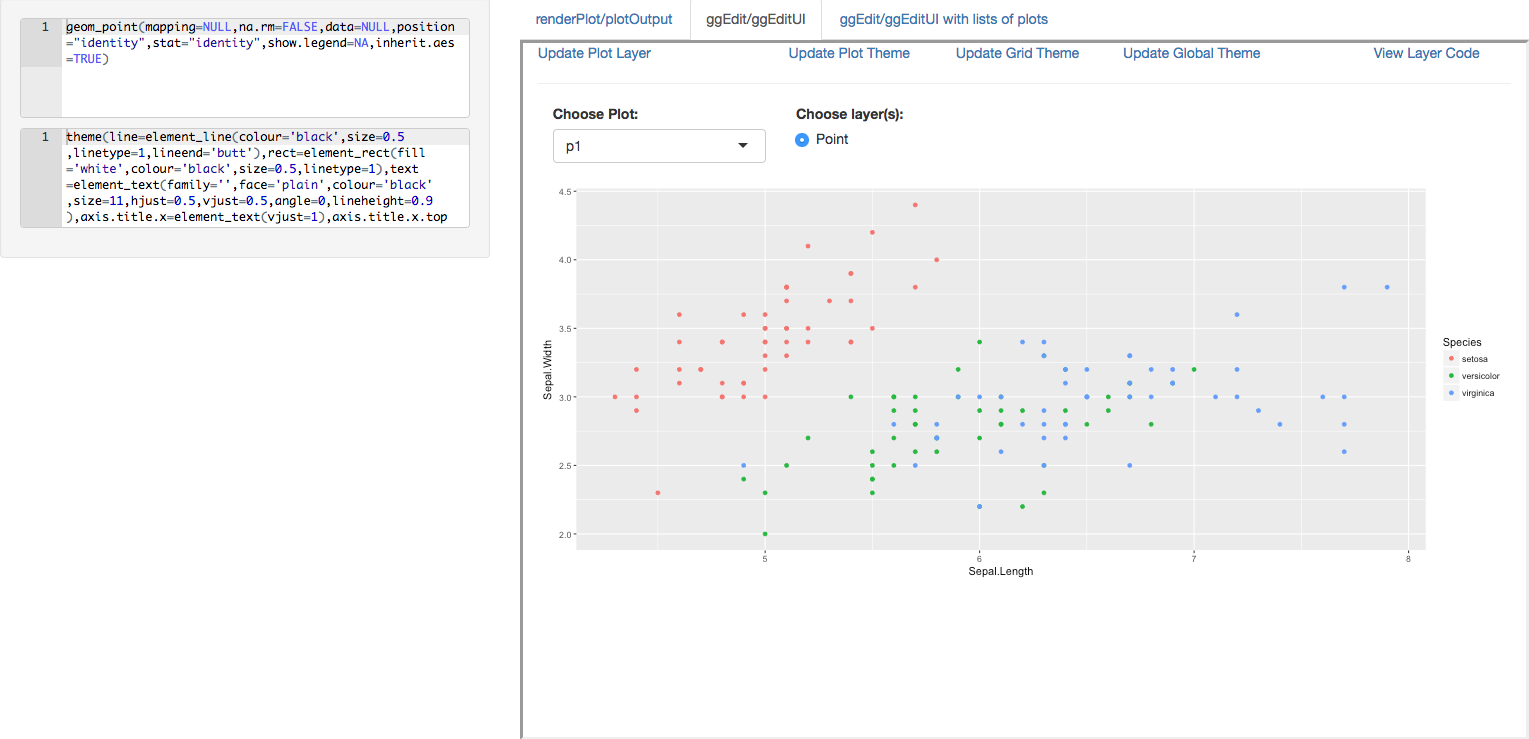 We are pleased to announce the release of the ggedit package on
 The collection of example flight data in json format available in
 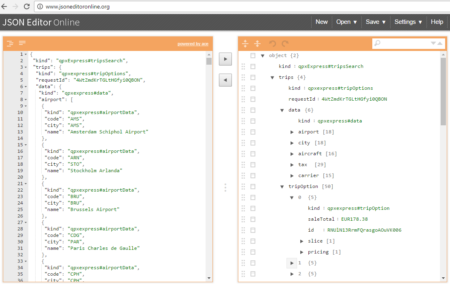 However, looking deeply into the object, several other elements are provided as the distance in mile, the segment, the duration, the carrier, etc. The R parser to transform the json structure in a usable dataframe requires the dplyr library for using the pipe operator (%>%) to streamline the code and make the parser more readable. Nevertheless, the library actually wrangling through the lines is tidyjson and its powerful functions: